
Your email infrastructure. Handled by Flye
From sending domains and mailboxes to SPF, DKIM, DMARC and MX authentication checks, Flye brings domain setup, AI-powered warmup, mailbox health, blacklist monitoring and sending activity together in one platform.
Set up unlimited new domains and email accounts in minutes. Microsoft and Google email accounts start from $4.99/month.
Domains & Mailboxes
Set up sending domains, provision new mailboxes, or connect existing Google Workspace and Microsoft 365 accounts.
DNS Authentication
Monitor SPF, DKIM, DMARC, MX and additional DNS configuration checks in one dashboard.
AI-Powered Warmup
Manage account warmup and daily sending thresholds to help prepare mailboxes for outbound activity.
Automated Health Monitoring
Monitor sending-domain health, email account status, blacklist checks and sending activity.

Email account health
100alex@tryflye.com
Microsoft 365 · Active
Warmup · day 12
Running
Sent today
32 / 50
DNS settings
tryflye.com- SPFRecord found
- DKIMSelector present
- DMARCPolicy found
- MXMicrosoft 365
- BlacklistClean
Warmup active
7 accounts
Daily threshold · 58% used
From your first domain to every sending account.
Flye makes outbound infrastructure easier to manage, whether you're setting up your first sending domain or overseeing dozens of mailboxes across multiple accounts.
Set Up
Find sending domains, initiate mailbox provisioning, or connect existing accounts.
Configure & Warm Up
Flye sets up email authentication records, manages warmup, and configures sending controls.
Monitor & Manage
Track domain and mailbox health, available blacklist results, and daily sending activity.
Sending mailboxes, provisioned and ready to send.
Flye provisions dedicated Microsoft 365 and Google Workspace mailboxes for your outbound, so you don't need to buy, verify and configure sending accounts somewhere else. Each mailbox is hosted on the providers your recipients already trust, costs $4.99 per mailbox per month, and lives inside the same platform that runs your warmup, authentication checks and campaigns.
Because the mailbox is created inside Flye, its sending identity, authentication records and daily sending limits are configured at the same time — then reported in the same dashboard you already use for domains and campaigns. No third-party billing, no manual DNS work, nothing to reconcile later.
- Microsoft 365 and Google Workspace mailboxes, provisioned for you
- $4.99 per mailbox per month — no separate provider contract
- SPF, DKIM and DMARC set up when the mailbox is created
- Included in AI warmup and health monitoring from day one
- Add or remove mailboxes as your sending needs change
Provisioned by Flye
Ready to sendGoogle Workspace
Gmail sending identity
- SPF, DKIM & DMARC
- Warmup from day one
- Health monitored
Microsoft 365
Outlook sending identity
- SPF, DKIM & DMARC
- Warmup from day one
- Health monitored
Already have sending accounts? Bring them to Flye.
No need to start from scratch. If you've already set up dedicated outreach domains and mailboxes with Google Workspace or Microsoft 365, connect them to Flye and manage everything from one platform.
Bring your existing outbound infrastructure together with Flye's AI-powered warmup, mailbox health monitoring, and campaign automation.
- Google Workspace & Microsoft 365 — Connect your existing dedicated outreach mailboxes.
- Multiple domains & providers — Manage sending accounts across domains and providers.
- AI Warmup & Health Monitoring — Monitor mailbox health, authentication, and sending activity.
- One Centralized Dashboard — Manage all your outreach accounts and campaigns in one place.
New to outbound? Flye can help you set up dedicated sending domains and mailboxes to keep outreach separate from your primary business email.
Connect with OAuth where it exists, or point Flye at any mailbox over SMTP and IMAP.
Google Workspace
OAuth connection
Microsoft 365
OAuth connection
Zoho Mail
OAuth connection
SMTP & IMAP
Any mail server
Your own provider — if it sends mail, it connects.
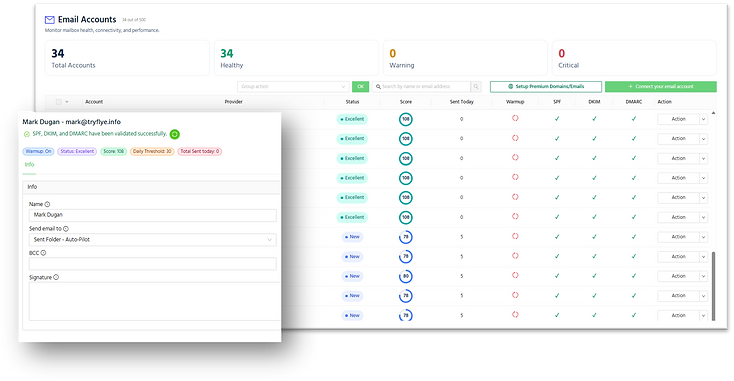
One clean overview of everything that sends.
Provider, connection status, health score, volume sent today, and warmup state — per mailbox, in one table.
Connection status
See which accounts are healthy, which need attention, and which are disconnected.
Sending volume
Track how much each mailbox has sent today against the pace warmup allows.
Authentication
SPF, DKIM and DMARC state visible for every account, not buried in DNS records.

Your email reputation. Managed by Flye AI.
Forget manually warming up mailboxes, adjusting sending volumes, or monitoring account health. Flye's AI automatically manages your email warmup in the background, helping build and maintain a healthy sending reputation while you focus on growing your pipeline.
From new mailboxes to established outreach accounts, Flye continuously monitors sending health and adjusts warmup activity—without requiring manual intervention.
Fully Automated AI Warmup
Flye manages the entire warmup process automatically. No manual setup, scheduling, or daily adjustments.
Intelligent Volume Management
AI gradually adjusts warmup activity based on mailbox readiness and sending conditions.
Continuous Health Monitoring
Flye tracks mailbox health, authentication status, and sending activity to identify potential issues.
Ongoing Reputation Maintenance
Warmup isn't just for new accounts. Flye continues managing warmup activity as your outreach scales.
Monitored and managed by Flye
- SPF
- DKIM
- DMARC
- MX
- Blacklist
- Warmup
- Auto-rotation
- Automatic Delay
Warmup and reputation health
Watched continuously, adjusted automatically
Authorized senders declared
Message signing in place
Policy published
- SPF — Authorized senders declared
- DKIM — Message signing in place
- DMARC — Policy published
- MX — Mail routing configured
- Blacklist — Checked against available lists
Set up sending infrastructure with your account
Start a trial and connect your first mailbox.
Sending is infrastructure. Treat it like it.
Connect your domains and mailboxes, watch warmup and authentication, and keep campaigns running on healthy accounts.
Compare plans and pricing